

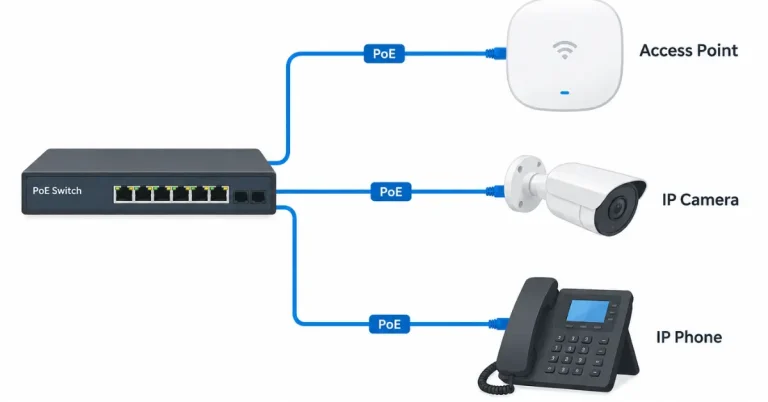
Power over Ethernet, usually shortened to PoE, lets a single network cable carry both data and electrical power. Instead of running a network cable and a power cable to a device, you run one cable. For offices, shops and warehouses, that makes some installations simpler, tidier and easier to manage.
This guide explains what PoE is, what it can power, how the different PoE levels compare, and what to check before you add it to your network.
What is Power over Ethernet?
PoE sends low-voltage power through the same twisted-pair cable that carries network data. A device at one end, usually a PoE switch or a PoE injector, supplies power. A device at the other end, such as a camera or phone, receives it.
The device being powered doesn’t need a nearby power point. It only needs a network cable run to it.
What can PoE power?
PoE suits devices that use a modest amount of power and are often installed in places where a power point is inconvenient:
- Wi-Fi access points, often mounted on ceilings
- IP security cameras, including outdoor cameras
- IP phones
- Door access controllers and intercoms
- Digital signage and small displays
- Some lighting and building control devices
PoE isn’t suited to everything. Computers, printers and large screens use more power than standard PoE provides, so they still need a normal power point.
PoE, PoE+ and PoE++: what's the difference?
There are three common PoE levels. They differ in how much power each port can supply.
Type | IEEE standard | Power from the switch port | Power available at the device |
PoE | 802.3af | Up to 15.4 W | About 12.95 W |
PoE+ | 802.3at | Up to 30 W | About 25 W |
PoE++ (Type 3) | 802.3bt | Up to 60 W | About 51 W |
PoE++ (Type 4) | 802.3bt | Up to 90 W | About 71 W |
The device always receives less than the switch sends, because some power is lost along the cable. Check the power a device needs against what it will actually receive.
Typical examples (always check the product’s specifications):
- IP phones and basic cameras often work on standard PoE
- Many Wi-Fi access points and PTZ cameras need PoE+
- High-power devices such as some displays and multi-radio access points may need PoE++
Benefits of PoE for businesses
- Fewer cables and fewer power points. One cable to each device.
- Flexible placement. You can mount an access point or camera where it works best, not where the power point happens to be.
- Central control. Power comes from the switch, so you can restart a device remotely, and one backup power supply (UPS) at the comms room can keep many devices running during an outage.
- Tidier installs. Fewer cables and plugs make the installation neater and easier to maintain.
Things to check before you add PoE
1. The switch's total power budget
A PoE switch has a total power budget as well as a per-port limit. A 24-port switch cannot necessarily deliver 30 W on every port at once. Add up the power needs of all the devices you plan to connect and compare the total with the switch’s budget.
2. The cable run
Ethernet cable runs are limited to about 100 metres, and PoE has the same limit. Devices beyond that distance need a different approach, such as a switch closer to the device.
3. Cable quality
Good-quality solid copper cable carries power efficiently. Cheaper cables can cause voltage loss, heat and unreliable devices, particularly on long runs or higher power levels. For help choosing a cable category, see our Cat6 vs Cat6A vs fibre guide.
4. Heat in large cable bundles
Higher-power PoE generates more heat in the cable. Where many cables are bundled together, the installer should account for this. Your cabler can advise whether a higher category cable makes sense for high-power runs.
5. Device compatibility
Most devices follow the IEEE standards, but some use proprietary PoE. Check that your switch and devices support the same type, or use a PoE injector for a single device.
6. Backup power
Because the switch supplies the power, a UPS at the switch keeps PoE devices running during a power outage. That is useful for cameras, door controllers and phones.
PoE switch or PoE injector?
PoE switch | PoE injector | |
What it does | Powers many devices from one unit | Powers a single device |
Best for | New installs and offices with many PoE devices | Adding one device to an existing non-PoE network |
Setup | Plugs into your network and powers connected devices | Sits between the existing switch and the device |
For anything beyond one or two devices, a PoE switch is usually simpler to manage.
Common PoE mistakes
- Ignoring the power budget. The switch is fine on paper but cannot power every device at once.
- Buying devices without checking the PoE type. A PoE+ device may not work reliably on a standard PoE port.
- Using poor-quality cable on long or high-power runs.
- No backup power for devices that matter, such as cameras and door access.
- Running cables beyond the distance limit.
- No plan for future devices. Leave spare switch ports and spare power budget.
Is PoE right for your business?
PoE is a good fit if you plan to install access points, cameras, phones or door controllers and want a clean, flexible layout. It is less relevant if your network is only computers and printers.
If you are planning a new office network, the best time to decide on PoE is before cabling is installed, because the cable runs and the position of the comms room determine what is possible.
FAQs
Does PoE need special cable?
No. PoE works over standard Ethernet cable, such as Cat5e and Cat6. Cable quality matters more at higher power and longer distances.
How far can PoE reach?
About 100 metres, the same limit as Ethernet. Longer distances need a switch closer to the device.
Can I use PoE with my existing network?
Often, yes. You can add a PoE switch, or use a PoE injector for a single device. Check whether the existing cabling is in good condition.
Is PoE safe?
PoE uses low-voltage power, which is why it is used for ceiling-mounted devices. Installation should still be done properly by a qualified cabler.
What is the difference between PoE and PoE+?
PoE+ supplies more power per port, up to 30 W compared with 15.4 W for standard PoE. Devices such as many access points and PTZ cameras need PoE+.
Do I need PoE for Wi-Fi access points?
Not strictly, but most business access points are designed to run on PoE because it makes ceiling installation simple.
Next steps
Planning PoE devices or a new office network? Our team can help with the cabling side through our power and data services in Perth.