

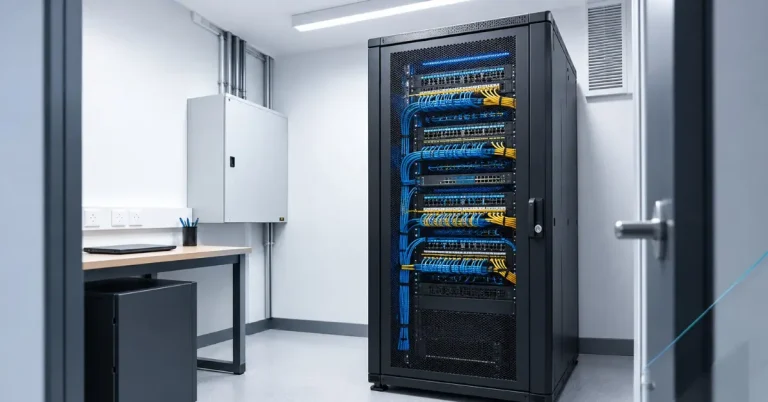
Every office network has a heart: the place where the internet connection comes in, the switches live and the cables from every desk end up. In a small office that might be a cupboard, a lockable cabinet or a small dedicated room. Planned well, it is quiet, tidy and easy to work on. Planned badly, it becomes a hot, cluttered space that is hard to maintain and causes outages.
This guide covers the practical basics of planning a small comms room or server cabinet, so you can brief your cabler and electrician properly.
Comms room, server room or cabinet?
- Comms cabinet: a lockable rack in a corner, storeroom or cupboard. Suits small offices with a modest amount of equipment.
- Comms room: a small dedicated room that holds the rack or racks, patch panels, switches and the internet connection point.
- Server room: a comms room that also holds servers. Servers generate far more heat and need more power and cooling.
Many small offices now use cloud services and need only a comms cabinet. If you still run servers on site, plan for a room.
Step 1: Choose the right location
- Central. Cable runs to desks stay short. Ethernet is limited to about 100 metres from the switch.
- Accessible. Technicians need room to work, and equipment must be able to get in and out, so check the door width.
- Dry. Avoid rooms with water pipes running through or directly above them, such as under kitchens and bathrooms.
- Secure. The room should lock, with access limited to the people who need it.
- Not a storage room. A cupboard that doubles as stationery storage tends to fill with boxes that block airflow and access.
Step 2: Allow enough space
- Leave clear space in front of the rack so a technician can open doors and work comfortably.
- Leave space behind or beside the rack for cable management.
- Plan about 20 per cent spare rack capacity for growth. Office technology tends to expand within a few years.
- Keep some spare rack units free for extra switches, a UPS or a patch panel.
Step 3: Plan the power
- Use dedicated circuits where possible, so equipment isn’t sharing a circuit with kettles and heaters.
- Provide enough outlets per rack for switches, patch panels, a router, a UPS and any servers. It is easier to add outlets at the start than later.
- Consider a UPS (uninterruptible power supply) so that equipment keeps running through short outages and shuts down safely during longer ones.
- Think about future loads. If you add PoE devices such as cameras and access points, the switches will draw more power. See our PoE guide.
- If you will be adding significant equipment, ask an electrician to check the circuit and board capacity.
Step 4: Keep it cool
Networking equipment gives off heat, and heat shortens its life. Most equipment is designed to run in a range of roughly 18 to 27°C, although you should check manufacturer specifications.
- Cabinets and small rooms get hot quickly. A closed cupboard with a few switches can overheat in summer, which in Perth is a real risk.
- Ventilation helps for small loads, such as a vented door or fan.
- Dedicated cooling, usually a split-system air conditioner, is needed for rooms with more equipment or any servers.
- Make sure the air conditioner is on a separate, reliable supply so that the room isn’t cooled only when the main office air conditioning is on.
- Check the temperature occasionally. A basic temperature sensor with an alert costs little compared with a hardware failure.
Step 5: Plan the cabling
- Patch panels terminate the cables from each desk, and short patch leads link them to the switches.
- Use cable management, such as horizontal managers and vertical channels, so cables don’t tangle and block airflow.
- Label everything. Each cable should be identifiable at both ends, so changes and faults can be dealt with quickly.
- Where power and data cables run in the room, keep them apart and tidy, as set out by your cabler and electrician.
- Plan how cables enter the room, whether from the ceiling, a floor duct or a wall, and leave room for more cables later. See our guide to cable tray, conduit and trunking.
Step 6: Plan for growth
- Spare rack space and spare power outlets.
- Spare switch ports for new desks, cameras and access points.
- A fibre link if your office has several floors or a second cabinet, because longer distances may need fibre.
- Spare conduit or tray capacity, since adding pathways later is far more disruptive than building them in at the start.
Small comms room checklist
☐ Central, dry, lockable location
☐ Door wide enough for equipment
☐ Clear working space in front of the rack
☐ About 20% spare rack capacity
☐ Dedicated circuits and enough outlets
☐ UPS for key equipment
☐ Ventilation or dedicated cooling
☐ Patch panels and cable management
☐ All cables labelled at both ends
☐ Spare capacity for power, ports and pathways
Common mistakes
- Putting the rack in a storeroom, then stacking boxes against it
- No ventilation, so the cabinet overheats in summer
- Too few power outlets, leading to power boards daisy-chained together
- Cables left unlabelled and tangled
- No spare capacity, so the first expansion means a rebuild
- Placing the comms room far from the working areas, which lengthens cable runs
FAQs
How big should a small comms room be?
It depends on the equipment, but it should allow clear working space in front of the rack and room to grow. A cabinet is often enough for a small office, while a dedicated room suits larger offices or those with servers.
Do I need air conditioning in a comms room?
Not always. A small cabinet with a few switches may only need good ventilation. A room with servers or more equipment usually needs dedicated cooling, especially in Perth summers.
Do I need a UPS?
A UPS is a good idea for key equipment such as the router, switches and servers. It protects against short outages and allows a safe shutdown.
Can the comms room be in a storeroom?
It can, if the space is kept clear, ventilated and lockable. Equipment crammed behind stored items will overheat and be hard to reach.
Should I use a wall-mounted cabinet or a floor rack?
Wall-mounted cabinets suit a few switches and patch panels. Floor racks suit more equipment and give more room for growth.